How to Download a YouTube Thumbnail in HD
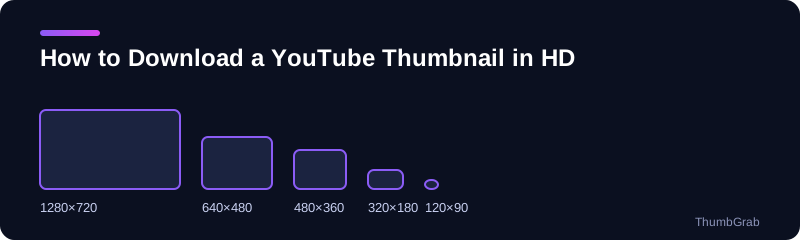
The highest-quality thumbnail YouTube serves is 1280×720. Here is how to get it, and what to do when it is not there.
Quick method
- Copy the video link from the browser bar or the Share menu.
- Paste it into the box on the free YouTube thumbnail downloader and press Get thumbnails.
- Choose the entry labelled 1280×720 and download it. The file arrives with a clean, descriptive name instead of maxresdefault.jpg.
What HD means here
HD is the 1280×720 render, which is the largest public thumbnail YouTube serves. Some sites advertise 4K thumbnails, but a file cannot be larger than what YouTube publishes, so be careful with any download button that promises more. The real resolution is printed next to each file.
If there is no HD file
Videos uploaded in standard definition, and some older ones, have no 1280×720 render. ThumbGrab marks it unavailable and offers 640×480 as the next best choice. The usual reasons are older or standard-definition uploads.
Keep the file in good shape
Save the JPG as it is and avoid re-saving it repeatedly in an editor, because each save of a JPG loses a little quality. To do this on a phone, read the next guide on how to download a YouTube thumbnail on phone and PC.
Common mistakes when downloading in HD
- Trusting a button labelled HD without checking the resolution.
- Choosing the 640×480 file and not noticing the black bars.
- Enlarging a small file and expecting more detail.
Why the highest quality matters
If you plan to print a thumbnail, put it in a presentation or use it in a document, the extra pixels of the 1280×720 file are visible. For a quick preview in a list, a smaller size is enough, but it is always better to start from the biggest file and shrink it than the other way round.
File naming
ThumbGrab names the download after the video and its resolution, so files do not pile up as identical maxresdefault.jpg entries in your downloads folder.
Frequently asked questions
How do I download a YouTube thumbnail in HD?
Paste the video link into ThumbGrab and download the entry labelled 1280×720.
Is there a 4K YouTube thumbnail?
Not from YouTube's public image files. They are generated at up to 1280×720.
Why is there no 1280×720 option for my video?
The HD file only exists for HD uploads. Older videos often lack it, and the next best size is 640×480.
Does the HD thumbnail have black bars?
No. The 1280×720 file is 16:9 and has none.
Is it free?
Yes, unlimited and with no sign-up.
Keep reading
- Next guide: Download a YouTube thumbnail on phone and PC
- The tool for this topic: download YouTube thumbnails in HD
- Back to the free YouTube thumbnail downloader